Time To Live (TTL)
TTL (Time To Live) automatically drops old partitions based on data age. Set a retention period, and QuestDB removes partitions that fall entirely outside that window - no cron jobs or manual cleanup required.
Requirements
TTL requires:
- A designated timestamp column
- Partitioning enabled
These are standard for time-series tables in QuestDB.
Setting TTL
At table creation
CREATE TABLE trades (
    ts TIMESTAMP,
    symbol SYMBOL,
    price DOUBLE
) TIMESTAMP(ts) PARTITION BY DAY TTL 7 DAYS;
On existing tables
ALTER TABLE trades SET TTL 7 DAYS;
Supported units: HOUR/H, DAY/D, WEEK/W, MONTH/M, YEAR/Y.
-- These are equivalent
ALTER TABLE trades SET TTL 2 WEEKS;
ALTER TABLE trades SET TTL 2w;
For full syntax, see ALTER TABLE SET TTL.
How TTL works
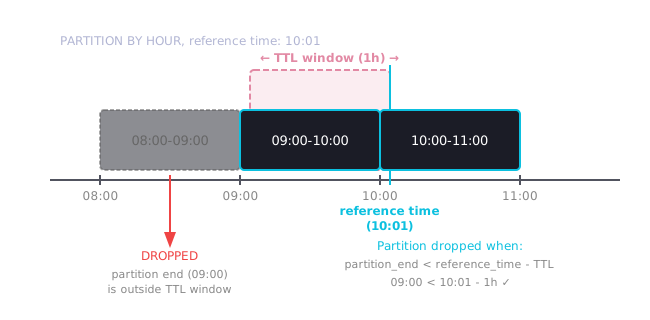
TTL drops partitions based on the partition's time range, not individual row timestamps. A partition is dropped only when its entire period falls outside the TTL window.
Key rule: A partition is dropped when
partition_end_time < reference_time - TTL.
Reference time
Generally, QuestDB uses the latest (maximum) timestamp in the table as the reference time to decide when to drop a partition. However, this rule alone has a hidden danger: if you ever accidentally insert a single row with a timestamp far in the future, you immediately lose all the data in the table.
This is why, by default, QuestDB caps the data-driven timestamp with the actual wall-clock time.
So the formula for the TTL reference time is:
reference_time := min(wall_clock_time, latest_timestamp)
Restore legacy behavior
To restore QuestDB's legacy behavior (using only the latest timestamp), set this
in server.conf:
cairo.ttl.use.wall.clock=false
If you disable capping by wall-clock and then insert a row with a future timestamp (e.g., year 2100), QuestDB will immediately drop all partitions that are behind the TTL window relative to that future time.
Put another way, you can lose all your data due to a single invalid data point.
Example
Table partitioned by HOUR with TTL 1 HOUR:
| Wall-clock time | Action | Partitions remaining |
|---|---|---|
| 08:00 | Insert row at 08:00 | 08:00-09:00 |
| 09:00 | Insert row at 09:00 | 08:00-09:00, 09:00-10:00 |
| 09:59 | Insert row at 09:59 | 08:00-09:00, 09:00-10:00 |
| 10:00 | Insert row at 10:00 | 09:00-10:00, 10:00-11:00 |
The 08:00-09:00 partition survives until 10:00 because its end time
(09:00) must be more than 1 hour behind the reference time. At 10:00, the
partition end (09:00) is exactly 1 hour old, so it's dropped.
Checking TTL settings
SELECT table_name, ttlValue, ttlUnit FROM tables();
| table_name | ttlValue | ttlUnit |
|---|---|---|
| trades | 7 | DAY |
| metrics | 0 | null |
A ttlValue of 0 means TTL is not configured.
Removing TTL
To disable automatic deletion and keep all data:
ALTER TABLE trades SET TTL 0h;
Guidelines
| Data type | Typical TTL | Rationale |
|---|---|---|
| Real-time metrics | 1-7 days | High volume, recent data most valuable |
| Trading data | 30-90 days | Compliance requirements vary |
| Aggregated data | 1-2 years | Lower volume, longer analysis windows |
| Audit logs | Per compliance | Often legally mandated retention |
Tips:
- Match TTL to your longest typical query range plus a buffer
- TTL should be significantly larger than your partition interval
- For manual control instead of automatic TTL, see Data Retention